

Published: Mar 18, 2026 by Isaac Johnson
I had bookmarked this article on NewStack about VerticalPodAutoscaling finally going GA. It’s been around for a while, and can be really useful with StatefulSets. I wanted to try in on Deployments (Replicasets) and see how it really works.
My “test” cluster was on v1.31.9 so it seemed a simple K3s upgrade aught to sort me out…
Upgrading K3s
Presently my test cluster is running v1.31.9 which is good, but we really want a newer v1.35 to properly test out the built-in vertical pod autoscaling
$ kubectl get nodes
NAME                  STATUS   ROLES                  AGE    VERSION
builder-macbookpro2   Ready    <none>                 265d   v1.31.9+k3s1
isaac-macbookair      Ready    control-plane,master   265d   v1.31.9+k3s1
isaac-macbookpro      Ready    <none>                 265d   v1.31.9+k3s1
We’ll follow the automated upgrade docs
I’ll first apply the upgrade controller
$ kubectl apply -f https://github.com/rancher/system-upgrade-controller/releases/latest/download/crd.yaml -f https://github.com/rancher/system-upgrade-controller/releases/latest/download/system-upgrade-controller.yaml
customresourcedefinition.apiextensions.k8s.io/plans.upgrade.cattle.io created
namespace/system-upgrade created
serviceaccount/system-upgrade created
role.rbac.authorization.k8s.io/system-upgrade-controller created
clusterrole.rbac.authorization.k8s.io/system-upgrade-controller created
clusterrole.rbac.authorization.k8s.io/system-upgrade-controller-drainer created
rolebinding.rbac.authorization.k8s.io/system-upgrade created
clusterrolebinding.rbac.authorization.k8s.io/system-upgrade created
clusterrolebinding.rbac.authorization.k8s.io/system-upgrade-drainer created
configmap/default-controller-env created
deployment.apps/system-upgrade-controller created
Then create an upgrade manifest (and yes, there is a typo I’ll figure out soon)
$ cat updatek3s.yaml
# Server plan
apiVersion: upgrade.cattle.io/v1
kind: Plan
metadata:
  name: server-plan
  namespace: system-upgrade
spec:
  concurrency: 1
  cordon: true
  version: v.1.35.1+k3s1
  nodeSelector:
    matchExpressions:
    - key: node-role.kubernetes.io/control-plane
      operator: In
      values:
      - "true"
  serviceAccountName: system-upgrade
  upgrade:
    image: rancher/k3s-upgrade
  channel: https://update.k3s.io/v1-release/channels/stable
---
# Agent plan
apiVersion: upgrade.cattle.io/v1
kind: Plan
metadata:
  name: agent-plan
  namespace: system-upgrade
spec:
  concurrency: 1
  cordon: true
  version: v.1.35.1+k3s1
  nodeSelector:
    matchExpressions:
    - key: node-role.kubernetes.io/control-plane
      operator: DoesNotExist
  prepare:
    args:
    - prepare
    - server-plan
    image: rancher/k3s-upgrade
  serviceAccountName: system-upgrade
  upgrade:
    image: rancher/k3s-upgrade
  channel: https://update.k3s.io/v1-release/channels/stable
I’ll apply the upgrade plan
$ kubectl apply -f ./updatek3s.yaml
plan.upgrade.cattle.io/server-plan created
plan.upgrade.cattle.io/agent-plan created
and generally this moves fast so I’ll check my nodes
$ kubectl get nodes
NAME                  STATUS                     ROLES                  AGE    VERSION
builder-macbookpro2   Ready                      <none>                 265d   v1.31.9+k3s1
isaac-macbookair      Ready,SchedulingDisabled   control-plane,master   265d   v1.31.9+k3s1
isaac-macbookpro      Ready                      <none>                 265d   v1.31.9+k3s1
hmm.. nothing is moving… let’s look at the plan status
$ kubectl -n system-upgrade get plans -o wide
NAME          IMAGE                 CHANNEL                                            VERSION         COMPLETE   MESSAGE   APPLYING
agent-plan    rancher/k3s-upgrade   https://update.k3s.io/v1-release/channels/stable   v.1.35.1+k3s1   False                ["isaac-macbookpro"]
server-plan   rancher/k3s-upgrade   https://update.k3s.io/v1-release/channels/stable   v.1.35.1+k3s1   False                ["isaac-macbookair"]
Ah! I used v.1.35.1+k3s1 instead of v1.35.1+k3s1! DOH!
At first I tried just applying a fixed copy
$ cat updatek3s.yaml
# Server plan
apiVersion: upgrade.cattle.io/v1
kind: Plan
metadata:
  name: server-plan
  namespace: system-upgrade
spec:
  concurrency: 1
  cordon: true
  version: v1.35.1+k3s1
  nodeSelector:
    matchExpressions:
    - key: node-role.kubernetes.io/control-plane
      operator: In
      values:
      - "true"
  serviceAccountName: system-upgrade
  upgrade:
    image: rancher/k3s-upgrade
  channel: https://update.k3s.io/v1-release/channels/stable
---
# Agent plan
apiVersion: upgrade.cattle.io/v1
kind: Plan
metadata:
  name: agent-plan
  namespace: system-upgrade
spec:
  concurrency: 1
  cordon: true
  version: v1.35.1+k3s1
  nodeSelector:
    matchExpressions:
    - key: node-role.kubernetes.io/control-plane
      operator: DoesNotExist
  prepare:
    args:
    - prepare
    - server-plan
    image: rancher/k3s-upgrade
  serviceAccountName: system-upgrade
  upgrade:
    image: rancher/k3s-upgrade
  channel: https://update.k3s.io/v1-release/channels/stable
$ kubectl apply -f ./updatek3s.yaml
plan.upgrade.cattle.io/server-plan configured
plan.upgrade.cattle.io/agent-plan configured
$ kubectl -n system-upgrade get plans -o wide
NAME          IMAGE                 CHANNEL                                            VERSION        COMPLETE   MESSAGE   APPLYING
agent-plan    rancher/k3s-upgrade   https://update.k3s.io/v1-release/channels/stable   v1.35.1+k3s1   False                ["isaac-macbookpro"]
server-plan   rancher/k3s-upgrade   https://update.k3s.io/v1-release/channels/stable   v1.35.1+k3s1   False                ["isaac-macbookair"]
But I saw nothing was moving. So I removed the plan then re-added it
$ kubectl delete -f ./updatek3s.yaml
plan.upgrade.cattle.io "server-plan" deleted
plan.upgrade.cattle.io "agent-plan" deleted

$ kubectl -n system-upgrade get plans -o wide
No resources found in system-upgrade namespace.

$ kubectl apply -f ./updatek3s.yaml
plan.upgrade.cattle.io/server-plan created
plan.upgrade.cattle.io/agent-plan created
Now I’ll check my nodes
$ kubectl get nodes
NAME                  STATUS                     ROLES                  AGE    VERSION
builder-macbookpro2   Ready                      <none>                 265d   v1.31.9+k3s1
isaac-macbookair      Ready,SchedulingDisabled   control-plane,master   265d   v1.31.9+k3s1
isaac-macbookpro      Ready                      <none>                 265d   v1.31.9+k3s1
Seeing the “SchedulingDisabled” was a good sign.
I checked again
$ kubectl get nodes
NAME                  STATUS   ROLES                  AGE    VERSION
builder-macbookpro2   Ready    <none>                 265d   v1.31.9+k3s1
isaac-macbookair      Ready    control-plane,master   265d   v1.35.1+k3s1
isaac-macbookpro      Ready    <none>                 265d   v1.31.9+k3s1
and the master was already upgraded
$ kubectl -n system-upgrade get plans -o wide
NAME          IMAGE                 CHANNEL                                            VERSION        COMPLETE   MESSAGE   APPLYING
agent-plan    rancher/k3s-upgrade   https://update.k3s.io/v1-release/channels/stable   v1.35.1+k3s1   False                ["builder-macbookpro2"]
server-plan   rancher/k3s-upgrade   https://update.k3s.io/v1-release/channels/stable   v1.35.1+k3s1   True
The nodes, however
$ kubectl -n system-upgrade get plans -o wide
NAME          IMAGE                 CHANNEL                                            VERSION        COMPLETE   MESSAGE   APPLYING
agent-plan    rancher/k3s-upgrade   https://update.k3s.io/v1-release/channels/stable   v1.35.1+k3s1   False                ["builder-macbookpro2"]
server-plan   rancher/k3s-upgrade   https://update.k3s.io/v1-release/channels/stable   v1.35.1+k3s1   True

$ kubectl get nodes
NAME                  STATUS                        ROLES                  AGE    VERSION
builder-macbookpro2   NotReady,SchedulingDisabled   <none>                 265d   v1.31.9+k3s1
isaac-macbookair      Ready                         control-plane,master   265d   v1.35.1+k3s1
isaac-macbookpro      Ready                         <none>                 265d   v1.31.9+k3s1
were taking a lot longer (granted they are very very old hosts).
I then pivoted to manually upgrading.
I would get the token and config
root@builder-MacBookPro2:/var/lib/rancher/k3s# cat /etc/systemd/system/k3s-agent.service.env
K3S_TOKEN='K10a18c07f24914cbe61277875fcb3e477fc063ada7cf69312f515909fa08b7dbf7::server:8ae66788f324cc82d03aa0171b9f59c4'
K3S_URL='https://192.168.1.77:6443'
Now I can use that to launch
$ curl -sfL https://get.k3s.io | INSTALL_K3S_VERSION=v1.35.1+k3s1 K3S_URL=https://192.168.1.77:6443 K3S_TOKEN=K10a18c07f24914cbe61277875fcb3e477fc063ada7cf69312f515909fa08b7dbf7::server:8ae66788f324cc82d03aa0171b9f59c4 sh -
[INFO]  Using v1.35.1+k3s1 as release
[INFO]  Downloading hash https://github.com/k3s-io/k3s/releases/download/v1.35.1%2Bk3s1/sha256sum-amd64.txt
[INFO]  Skipping binary downloaded, installed k3s matches hash
[INFO]  Skipping installation of SELinux RPM
[INFO]  Skipping /usr/local/bin/kubectl symlink to k3s, already exists
[INFO]  Skipping /usr/local/bin/crictl symlink to k3s, already exists
[INFO]  Skipping /usr/local/bin/ctr symlink to k3s, command exists in PATH at /usr/bin/ctr
[INFO]  Creating killall script /usr/local/bin/k3s-killall.sh
[INFO]  Creating uninstall script /usr/local/bin/k3s-agent-uninstall.sh
[INFO]  env: Creating environment file /etc/systemd/system/k3s-agent.service.env
[INFO]  systemd: Creating service file /etc/systemd/system/k3s-agent.service
[INFO]  systemd: Enabling k3s-agent unit
Created symlink /etc/systemd/system/multi-user.target.wants/k3s-agent.service → /etc/systemd/system/k3s-agent.service.
[INFO]  systemd: Starting k3s-agent
Job for k3s-agent.service failed because the service did not take the steps required by its unit configuration.
See "systemctl status k3s-agent.service" and "journalctl -xe" for details.
But that still didn’t seem to work
$ kubectl get nodes
NAME                  STATUS                        ROLES                  AGE    VERSION
builder-macbookpro2   NotReady,SchedulingDisabled   <none>                 265d   v1.31.9+k3s1
isaac-macbookair      Ready                         control-plane,master   265d   v1.35.1+k3s1
isaac-macbookpro      Ready                         <none>                 265d   v1.31.9+k3s1


$ sudo systemctl stop k3s-agent
$ sudo systemctl start k3s-agent
That failed
$ kubectl get nodes
NAME                  STATUS                        ROLES                  AGE    VERSION
builder-macbookpro2   NotReady,SchedulingDisabled   <none>                 265d   v1.31.9+k3s1
isaac-macbookair      Ready                         control-plane,master   265d   v1.35.1+k3s1
isaac-macbookpro      Ready                         <none>                 265d   v1.31.9+k3s1
Ubuntu 20.04 Focal and Kubernetes 1.35
It took me a whole day (delaying this post). I tried ansible playbooks
I could reset the whole cluster to v1.31.5 without issue. However, trying v1.35.1 failed with errors after hours…
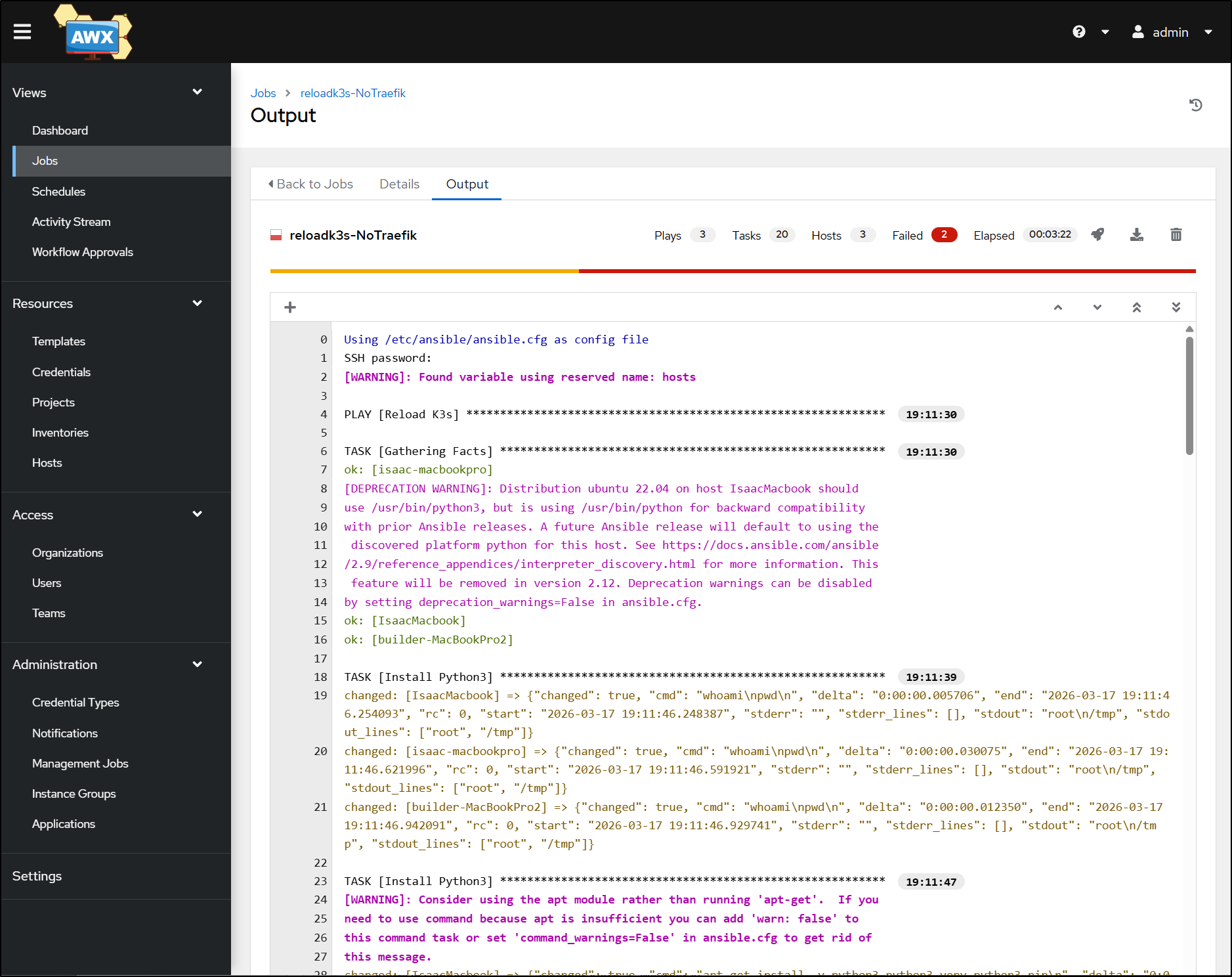
Timing out on the nodes
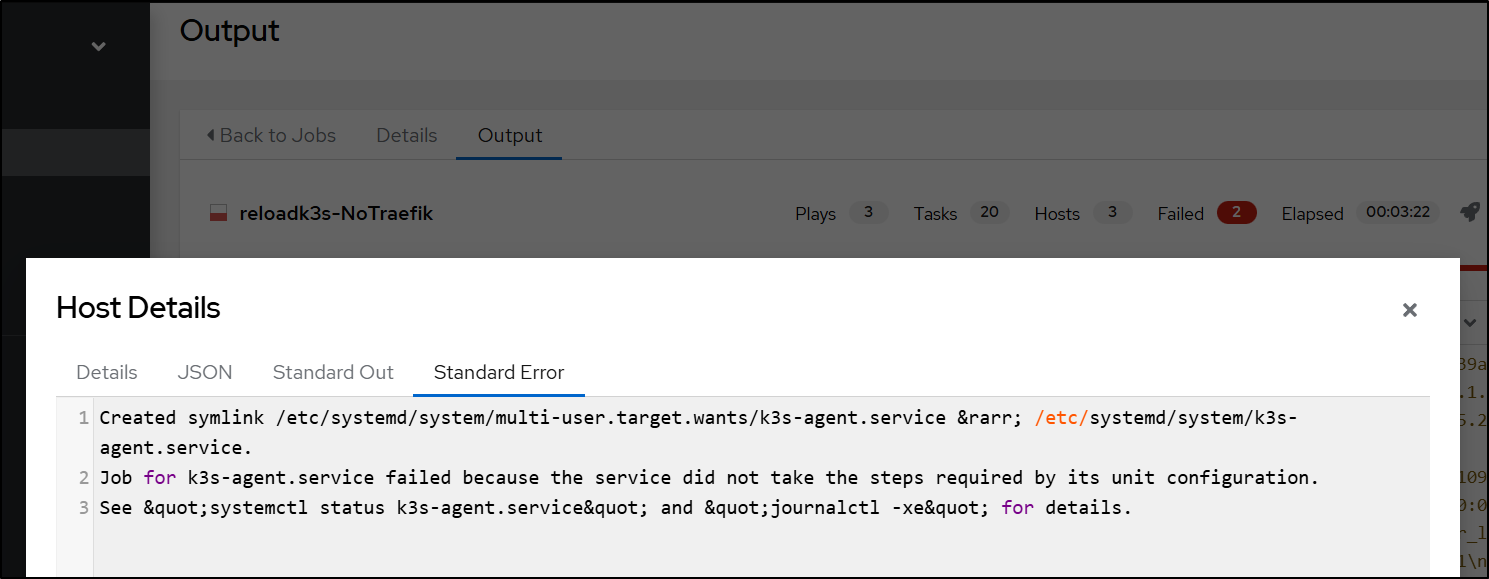
I then tried manually but it refused to start and join the master. The token was right, the IP of the master instance was right.
Journalctl showed a fatal error at startup saying “k3s kubelet is configured to not run on a host using cgroup v1”.
I then checked my hosts. Master was on an old Macbook Air running Ubuntu 22.04 but the old old old Macbook Pros were on Ubuntu 20.04 (focal). Perhaps this is just a case that the OS is too out of date.
For more hours I tried upgrading… They just refused to find a new release.
The usual pattern of:
$ sudo apt update
$ sudo apt upgrade
$ sudo do-release-upgrade
Would just return “No new release found”.
I then fired up ‘deep thinking’ Gemini to see if it had any other ideas (my next step would be to burn a thumb drive with Jammy and just do it all over - but then i have to pull laptops from a rack and that’s another big hassle)
builder@isaac-MacBookPro:~$ lsb_release -a

No LSB modules are available.

Distributor ID: Ubuntu

Description:    Ubuntu 20.04.6 LTS

Release:        20.04

Codename:       focal


Yet, it refuses to upgrade:


builder@isaac-MacBookPro:~$ sudo do-release-upgrade -d

Checking for a new Ubuntu release

Upgrades to the development release are only

available from the latest supported release.


What can i do to force it to upgrade to Ubuntu 22?
Gemini proposed two paths - so I tried both - each on a different host:
1. “Force” Method via “dist-upgrade”
First, we tell the system to look at Jammy instead of Focal Fossa (20.04)
$ sudo sed -i 's/focal/jammy/g' /etc/apt/sources.list
Then run each of these steps
$ sudo apt update
$ sudo apt upgrade --without-new-pkgs -y
$ sudo apt full-upgrade -y
2. “Fix” the do-release-upgrade
We can force the upgrader tool to reinstall itself and hope that clears out the cobwebs
$ sudo apt install --reinstall ubuntu-release-upgrader-core
$ sudo do-release-upgrade
You have to babysit it a bit - this killed my overnight updates because one timed out asking about the sudoers and the other timed out asking about Firefox being configured for snap. I really wish they had something like “–yolo” or “–fuggoff-and-just-do-it”
Because in both my cases they timed out, closing the SSH session after a while, I had to force kill stuck apt processes and then fix before trying again
$ sudo kill <apt process>
$ sudo dpkg --configure -a
$ sudo apt --fix-broken install
FUBAR
In the end, on reboot, both laptops were in a failed state, refusing to boot into a desktop - caught in a recovery mode with little options (as it had no network nor clue how to resolve)
So I was forced to do it the full blast way - use a thumb drive

Also, with 24.04, the old “gnome-tweaks” method of preventing sleep on lid closure is gone so you have t use the logind.conf method (see: askubuntu post)
And i always forget there are crazy people out there that use Nano.. ick.
builder@builder-MacBookPro8-1:~$ sudo update-alternatives --config editor
There are 4 choices for the alternative editor (providing /usr/bin/editor).

  Selection    Path                Priority   Status
------------------------------------------------------------
* 0            /bin/nano            40        auto mode
  1            /bin/ed             -100       manual mode
  2            /bin/nano            40        manual mode
  3            /usr/bin/vim.basic   30        manual mode
  4            /usr/bin/vim.tiny    15        manual mode

Press <enter> to keep the current choice[*], or type selection number: 3
update-alternatives: using /usr/bin/vim.basic to provide /usr/bin/editor (editor) in manual mode
Once live, I did the usual steps of adding docker and openssh-server. But next I wanted to try and rejoin the host to the control-plane:
builder@builder-MacBookPro8-1:~$ curl -sfL https://get.k3s.io | INSTALL_K3S_VERSION=v1.35.1+k3s1 K3S_URL=https://192.168.1.77:6443 K3S_TOKEN=K1092e2cff3c646a253da6a2aa177d0edd6626fc1c553d379cda72edf0035742bcb::server:7756fd74f3b4d1b739ab50ce337ef220 sh -
[INFO]  Using v1.35.1+k3s1 as release
[INFO]  Downloading hash https://github.com/k3s-io/k3s/releases/download/v1.35.1%2Bk3s1/sha256sum-amd64.txt
[INFO]  Downloading binary https://github.com/k3s-io/k3s/releases/download/v1.35.1%2Bk3s1/k3s
[INFO]  Verifying binary download
[INFO]  Installing k3s to /usr/local/bin/k3s
[INFO]  Skipping installation of SELinux RPM
[INFO]  Creating /usr/local/bin/kubectl symlink to k3s
[INFO]  Creating /usr/local/bin/crictl symlink to k3s
[INFO]  Skipping /usr/local/bin/ctr symlink to k3s, command exists in PATH at /usr/bin/ctr
[INFO]  Creating killall script /usr/local/bin/k3s-killall.sh
[INFO]  Creating uninstall script /usr/local/bin/k3s-agent-uninstall.sh
[INFO]  env: Creating environment file /etc/systemd/system/k3s-agent.service.env
[INFO]  systemd: Creating service file /etc/systemd/system/k3s-agent.service
[INFO]  systemd: Enabling k3s-agent unit
Created symlink /etc/systemd/system/multi-user.target.wants/k3s-agent.service → /etc/systemd/system/k3s-agent.service.
[INFO]  systemd: Starting k3s-agent
Now we finally see some worker nodes added!
$ kubectl get nodes
NAME                    STATUS   ROLES           AGE   VERSION
builder-macbookpro8-1   Ready    <none>          56s   v1.35.1+k3s1
isaac-macbookair        Ready    control-plane   13h   v1.35.1+k3s1
VPA
K3s already has a metrics server, so the first thing we really need to do is add the VPA.
The steps I’ll be following are similar to those in theNewStack article, but not identical.
We can make it easy by using the autoscaler repo and the install script
builder@DESKTOP-QADGF36:~/Workspaces$ git clone https://github.com/kubernetes/autoscaler.git
Cloning into 'autoscaler'...
remote: Enumerating objects: 239035, done.
remote: Counting objects: 100% (1580/1580), done.
remote: Compressing objects: 100% (1108/1108), done.
remote: Total 239035 (delta 987), reused 475 (delta 471), pack-reused 237455 (from 2)
Receiving objects: 100% (239035/239035), 256.72 MiB | 10.56 MiB/s, done.
Resolving deltas: 100% (155817/155817), done.
Updating files: 100% (5897/5897), done.
builder@DESKTOP-QADGF36:~/Workspaces$ cd autoscaler/
builder@DESKTOP-QADGF36:~/Workspaces/autoscaler$ cd vertical-pod-autoscaler/
builder@DESKTOP-QADGF36:~/Workspaces/autoscaler/vertical-pod-autoscaler$
Once cloned down, we can fire up the “hack” install script
builder@DESKTOP-QADGF36:~/Workspaces/autoscaler/vertical-pod-autoscaler$ cat ./hack/vpa-up.sh
#!/bin/bash

# Copyright 2018 The Kubernetes Authors.
#
# Licensed under the Apache License, Version 2.0 (the "License");
# you may not use this file except in compliance with the License.
# You may obtain a copy of the License at
#
#     http://www.apache.org/licenses/LICENSE-2.0
#
# Unless required by applicable law or agreed to in writing, software
# distributed under the License is distributed on an "AS IS" BASIS,
# WITHOUT WARRANTIES OR CONDITIONS OF ANY KIND, either express or implied.
# See the License for the specific language governing permissions and
# limitations under the License.

set -o errexit
set -o nounset
set -o pipefail

SCRIPT_ROOT=$(dirname ${BASH_SOURCE})/..
DEFAULT_TAG="1.6.0"
TAG_TO_APPLY=${TAG-$DEFAULT_TAG}

if [ "${TAG_TO_APPLY}" == "${DEFAULT_TAG}" ]; then
  git switch --detach vertical-pod-autoscaler-${DEFAULT_TAG}
fi

$SCRIPT_ROOT/hack/vpa-process-yamls.sh apply $*
builder@DESKTOP-QADGF36:~/Workspaces/autoscaler/vertical-pod-autoscaler$ ./hack/vpa-up.sh
HEAD is now at 9196162ba Update VPA default version to 1.6.0
customresourcedefinition.apiextensions.k8s.io/verticalpodautoscalercheckpoints.autoscaling.k8s.io created
customresourcedefinition.apiextensions.k8s.io/verticalpodautoscalers.autoscaling.k8s.io created
clusterrole.rbac.authorization.k8s.io/system:metrics-reader created
clusterrole.rbac.authorization.k8s.io/system:vpa-actor created
clusterrole.rbac.authorization.k8s.io/system:vpa-status-actor created
clusterrole.rbac.authorization.k8s.io/system:vpa-checkpoint-actor created
clusterrole.rbac.authorization.k8s.io/system:evictioner created
clusterrole.rbac.authorization.k8s.io/system:vpa-updater-in-place created
clusterrolebinding.rbac.authorization.k8s.io/system:vpa-updater-in-place-binding created
clusterrolebinding.rbac.authorization.k8s.io/system:metrics-reader created
clusterrolebinding.rbac.authorization.k8s.io/system:vpa-actor created
clusterrolebinding.rbac.authorization.k8s.io/system:vpa-status-actor created
clusterrolebinding.rbac.authorization.k8s.io/system:vpa-checkpoint-actor created
clusterrole.rbac.authorization.k8s.io/system:vpa-target-reader created
clusterrolebinding.rbac.authorization.k8s.io/system:vpa-target-reader-binding created
clusterrolebinding.rbac.authorization.k8s.io/system:vpa-evictioner-binding created
serviceaccount/vpa-admission-controller created
serviceaccount/vpa-recommender created
serviceaccount/vpa-updater created
clusterrole.rbac.authorization.k8s.io/system:vpa-admission-controller created
clusterrolebinding.rbac.authorization.k8s.io/system:vpa-admission-controller created
clusterrole.rbac.authorization.k8s.io/system:vpa-status-reader created
clusterrolebinding.rbac.authorization.k8s.io/system:vpa-status-reader-binding created
role.rbac.authorization.k8s.io/system:leader-locking-vpa-updater created
rolebinding.rbac.authorization.k8s.io/system:leader-locking-vpa-updater created
role.rbac.authorization.k8s.io/system:leader-locking-vpa-recommender created
rolebinding.rbac.authorization.k8s.io/system:leader-locking-vpa-recommender created
deployment.apps/vpa-updater created
deployment.apps/vpa-recommender created
Generating certs for the VPA Admission Controller in /tmp/vpa-certs.
Certificate request self-signature ok
subject=CN=vpa-webhook.kube-system.svc
Uploading certs to the cluster.
secret/vpa-tls-certs created
Deleting /tmp/vpa-certs.
service/vpa-webhook created
deployment.apps/vpa-admission-controller created
service/vpa-webhook unchanged
With the pods now running
$ kubectl get po -n kube-system | grep vpa
vpa-admission-controller-5879bdc979-9cf85   1/1     Running   0          2m11s
vpa-recommender-59c7769c67-chrgn            1/1     Running   0          2m12s
vpa-updater-64888c8777-8djfw                1/1     Running   0          2m12s
Setup
First, I need some basic app for which to test.
Let’s fire up a simple hello-app
$ kubectl create deployment hello-server --image=us-docker.pkg.dev/google-samples/containers/gke/hello-app:1.0

$ kubectl get po
NAME                            READY   STATUS    RESTARTS   AGE
hello-server-66bd54ff48-vmjsx   1/1     Running   0          32s
I’ll do a nodeport service so we can see it without having to port-forward
$ kubectl expose deployment hello-server --type=NodePort --name=hello-service --port=8080
service/hello-service exposed

$ kubectl get svc
NAME            TYPE        CLUSTER-IP     EXTERNAL-IP   PORT(S)          AGE
hello-service   NodePort    10.43.50.228   <none>        8080:31445/TCP   2m56s
kubernetes      ClusterIP   10.43.0.1      <none>        443/TCP          12h
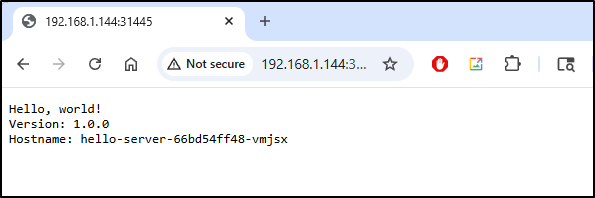
And here is our app
Updates without a VPA
Without a VPA, what happens when we edit our deployment to add some resource settings (or change them).
For instance, adding
    resources:
    requests:
        cpu: "50m"
        memory: "64Mi"
    limits:
        cpu: "200m"
        memory: "256Mi"
rotates the pods:
This means that if you have a mission critical workload that could take downtime rotating pods, changing your settings and limits is something pushed to the off-hours or emergency code red times.
Updates with a VPA
However, with VPAs, the Vertical Pod Autoscaler can work with the Metrics server to monitor our workload and adjust settings on demand - without modifying any running pod
Let’s create a new VPA for our deployment, but just to test things, we have “updateMode” set to “off” so it’s going to be a recommendation agent for now.
apiVersion: autoscaling.k8s.io/v1
kind: VerticalPodAutoscaler
metadata:
  name: hello-vpa
spec:
  targetRef:
    apiVersion: "apps/v1"
    kind: Deployment
    name: hello-server
  updatePolicy:
    updateMode: "Off"
  resourcePolicy:
    containerPolicies:
    - containerName: "hello-app"
      minAllowed:
        cpu: "25m"
        memory: "32Mi"
      maxAllowed:
        cpu: "1"
        memory: "512Mi"
      controlledResources: ["cpu", "memory"]
We’ll apply
$ kubectl apply -f ./vpa.yaml
verticalpodautoscaler.autoscaling.k8s.io/hello-vpa created
While you can use the YAML output for verbose details
$ kubectl get vpa hello-vpa -o yaml
apiVersion: autoscaling.k8s.io/v1
kind: VerticalPodAutoscaler
metadata:
  annotations:
    kubectl.kubernetes.io/last-applied-configuration: |
      {"apiVersion":"autoscaling.k8s.io/v1","kind":"VerticalPodAutoscaler","metadata":{"annotations":{},"name":"hello-vpa","namespace":"default"},"spec":{"resourcePolicy":{"containerPolicies":[{"containerName":"hello-app","controlledResources":["cpu","memory"],"maxAllowed":{"cpu":"1","memory":"512Mi"},"minAllowed":{"cpu":"25m","memory":"32Mi"}}]},"targetRef":{"apiVersion":"apps/v1","kind":"Deployment","name":"hello-server"},"updatePolicy":{"updateMode":"Off"}}}
  creationTimestamp: "2026-03-18T13:47:23Z"
  generation: 1
  name: hello-vpa
  namespace: default
  resourceVersion: "25299"
  uid: dce05dec-2e90-4eb3-ad2f-5daf5a1d489b
spec:
  resourcePolicy:
    containerPolicies:
    - containerName: hello-app
      controlledResources:
      - cpu
      - memory
      maxAllowed:
        cpu: "1"
        memory: 512Mi
      minAllowed:
        cpu: 25m
        memory: 32Mi
  targetRef:
    apiVersion: apps/v1
    kind: Deployment
    name: hello-server
  updatePolicy:
    updateMode: "Off"
status:
  conditions:
  - lastTransitionTime: "2026-03-18T13:47:35Z"
    status: "True"
    type: RecommendationProvided
  recommendation:
    containerRecommendations:
    - containerName: hello-app
      lowerBound:
        cpu: 25m
        memory: 250Mi
      target:
        cpu: 25m
        memory: 250Mi
      uncappedTarget:
        cpu: 25m
        memory: 250Mi
      upperBound:
        cpu: 213m
        memory: 250Mi
I rather prefer the wide output:
$ kubectl get vpa hello-vpa -o wide
NAME        MODE   CPU   MEM     PROVIDED   AGE
hello-vpa   Off    25m   250Mi   True       96s
next, I want to allow this to actually modify the resources by changing our update to “InPlaceOrRecreate”. This means it will first try to “patch” the pod, but if the pod acts like a little turd, it will replace and evict it next.
You’ll notice I change the updateMode as well as add “controlledValues” at the end:
$ cat vpa.yaml
apiVersion: autoscaling.k8s.io/v1
kind: VerticalPodAutoscaler
metad
  name: hello-vpa
spec:
  targetRef:
    apiVersion: "apps/v1"
    kind: Deployment
    name: hello-server
  updatePolicy:
    updateMode: "InPlaceOrRecreate"
  resourcePolicy:
    containerPolicies:
    - containerName: "hello-app"
      minAllowed:
        cpu: "25m"
        memory: "32Mi"
      maxAllowed:
        cpu: "1"
        memory: "512Mi"
      controlledResources: ["cpu", "memory"]
      controlledValues: "RequestsAndLimits"
$ kubectl apply -f ./vpa.yaml
verticalpodautoscaler.autoscaling.k8s.io/hello-vpa configured
$ kubectl get vpa hello-vpa -o wide
NAME        MODE                CPU   MEM     PROVIDED   AGE
hello-vpa   InPlaceOrRecreate   25m   250Mi   True       5m4s
I can see the pod was not cycled
$ kubectl get po
NAME                           READY   STATUS    RESTARTS   AGE
hello-server-cf5d4d7d5-fddxs   1/1     Running   0          78m
But I also don’t see it modified
$ kubectl describe po hello-server-cf5d4d7d5-fddxs | tail -n 30 | head -n 10
    Ready:          True
    Restart Count:  0
    Limits:
      cpu:     200m
      memory:  256Mi
    Requests:
      cpu:        50m
      memory:     64Mi
    Environment:  <none>
    Mounts:
Let’s create some load and see what happens
$ kubectl apply -f ./beat-it-up.yaml
pod/load-generator-1 created
pod/load-generator-2 created

$ kubectl get po
NAME                           READY   STATUS    RESTARTS   AGE
hello-server-cf5d4d7d5-fddxs   1/1     Running   0          89m
load-generator-1               1/1     Running   0          101s
load-generator-2               1/1     Running   0          101s
I let it run for a bit then checked the recommendations
$ kubectl get vpa hello-vpa -o jsonpath='{.status.recommendation.containerRecommendations[0].target}' ; echo
{"cpu":"25m","memory":"250Mi"}
The pod was still in place
$ kubectl get po
NAME                           READY   STATUS    RESTARTS   AGE
hello-server-cf5d4d7d5-fddxs   1/1     Running   0          95m
load-generator-1               1/1     Running   0          7m12s
load-generator-2               1/1     Running   0          7m12s
with the same resource limits/requests
$ kubectl describe po hello-server-cf5d4d7d5-fddxs | tail -n 30 | head -n 10
    Ready:          True
    Restart Count:  0
    Limits:
      cpu:     200m
      memory:  256Mi
    Requests:
      cpu:        50m
      memory:     64Mi
    Environment:  <none>
    Mounts:
I bumped my load generators up to 4 just really apply some pressure and then saw the numbers climb
$ kubectl get vpa hello-vpa -o jsonpath='{.status.recommendation.containerRecommendations[0].target}' ; echo
{"cpu":"247m","memory":"250Mi"}
The thing is the deployment has yet to change and the pod is still using the smaller requests
$ kubectl describe po -l app=hello-server | grep -A 3 "Requests:"
    Requests:
      cpu:        50m
      memory:     64Mi
    Environment:  <none>
the VPA is clearly showing it should replace
$ kubectl get vpa hello-vpa
NAME        MODE                CPU    MEM     PROVIDED   AGE
hello-vpa   InPlaceOrRecreate   247m   250Mi   True       39m
I tried recreating the VPA as well with the harsher “Recreate” option
$ cat vpa.yaml
apiVersion: autoscaling.k8s.io/v1
kind: VerticalPodAutoscaler
metadata:
  name: hello-vpa
spec:
  targetRef:
    apiVersion: "apps/v1"
    kind: Deployment
    name: hello-server
  updatePolicy:
    updateMode: "Recreate"
  resourcePolicy:
    containerPolicies:
    - containerName: "hello-app"
      minAllowed:
        cpu: "25m"
        memory: "32Mi"
      maxAllowed:
        cpu: "1"
        memory: "512Mi"
      controlledResources: ["cpu", "memory"]
      controlledValues: "RequestsAndLimits"
$ kubectl apply -f ./vpa.yaml
verticalpodautoscaler.autoscaling.k8s.io/hello-vpa configured
That seemed to do nothing
$ kubectl get vpa hello-vpa
NAME        MODE       CPU    MEM     PROVIDED   AGE
hello-vpa   Recreate   247m   250Mi   True       41m
$ kubectl describe po -l app=hello-server | grep -A 3 "Requests:"
    Requests:
      cpu:        50m
      memory:     64Mi
    Environment:  <none>
$ kubectl get po
NAME                           READY   STATUS    RESTARTS   AGE
hello-server-cf5d4d7d5-fddxs   1/1     Running   0          113m
load-generator-1               1/1     Running   0          12m
load-generator-2               1/1     Running   0          12m
load-generator-3               1/1     Running   0          12m
load-generator-4               1/1     Running   0          12m
I then forced the VPA to recreate
$ kubectl delete vpa hello-vpa
verticalpodautoscaler.autoscaling.k8s.io "hello-vpa" deleted
$ kubectl apply -f ./vpa.yaml
verticalpodautoscaler.autoscaling.k8s.io/hello-vpa created
$ kubectl get vpa hello-vpa
NAME        MODE       CPU   MEM   PROVIDED   AGE
hello-vpa   Recreate                          8s
It took about 40s to show fresh recommendations
$ kubectl get vpa hello-vpa
NAME        MODE       CPU   MEM   PROVIDED   AGE
hello-vpa   Recreate                          6s

$ kubectl get vpa hello-vpa
NAME        MODE       CPU    MEM     PROVIDED   AGE
hello-vpa   Recreate   247m   250Mi   True       49s
But nothing changed
$ kubectl get po
NAME                           READY   STATUS    RESTARTS   AGE
hello-server-cf5d4d7d5-fddxs   1/1     Running   0          150m
load-generator-1               1/1     Running   0          49m
load-generator-2               1/1     Running   0          49m
load-generator-3               1/1     Running   0          49m
load-generator-4               1/1     Running   0          49m
Pivot
Let’s try using the Nginx pod that the original article used instead. I want to see if it’s just the lightweight app I was using
$ kubectl create ns vpa-demo
namespace/vpa-demo created

$ cat ./vpa-nginx.yaml
apiVersion: apps/v1
kind: Deployment
metadata:
  name: nginx-vpa-demo
  namespace: vpa-demo
spec:
  replicas: 2
  selector:
    matchLabels:
      app: nginx-vpa-demo
  template:
    metadata:
      labels:
        app: nginx-vpa-demo
    spec:
      containers:
      - name: nginx
        image: nginx:1.25
        resources:
          requests:
            cpu: "50m"
            memory: "64Mi"
          limits:
            cpu: "200m"
            memory: "256Mi"
then apply
$ kubectl apply -f ./vpa-nginx.yaml
deployment.apps/nginx-vpa-demo created
I can see the pods are up
$ kubectl get po -n vpa-demo -l app=nginx-vpa-demo
NAME                              READY   STATUS    RESTARTS   AGE
nginx-vpa-demo-58d8649cf4-d85cb   1/1     Running   0          8m53s
nginx-vpa-demo-58d8649cf4-ptp9c   1/1     Running   0          8m53s
let’s do the recommendation version
$ cat vpa_nginx.yaml
apiVersion: autoscaling.k8s.io/v1
kind: VerticalPodAutoscaler
metadata:
  name: nginx-vpa
  namespace: vpa-demo
spec:
  targetRef:
    apiVersion: "apps/v1"
    kind: Deployment
    name: nginx-vpa-demo
  updatePolicy:
    updateMode: "Off"
  resourcePolicy:
    containerPolicies:
    - containerName: "nginx"
      minAllowed:
        cpu: "25m"
        memory: "32Mi"
      maxAllowed:
        cpu: "1"
        memory: "512Mi"
      controlledResources: ["cpu", "memory"]
$ kubectl apply -f ./vpa_nginx.yaml
verticalpodautoscaler.autoscaling.k8s.io/nginx-vpa created
And see it works
$ kubectl get vpa -n vpa-demo
NAME        MODE   CPU   MEM     PROVIDED   AGE
nginx-vpa   Off    25m   250Mi   True       60s
I’ll now flip it to inplace replacements
$ cat vpa-inplace.yaml
apiVersion: autoscaling.k8s.io/v1
kind: VerticalPodAutoscaler
metadata:
  name: nginx-vpa
  namespace: vpa-demo
spec:
  targetRef:
    apiVersion: "apps/v1"
    kind: Deployment
    name: nginx-vpa-demo
  updatePolicy:
    updateMode: "InPlaceOrRecreate"
  resourcePolicy:
    containerPolicies:
    - containerName: "nginx"
      minAllowed:
        cpu: "25m"
        memory: "32Mi"
      maxAllowed:
        cpu: "1"
        memory: "512Mi"
      controlledResources: ["cpu", "memory"]
      controlledValues: "RequestsAndLimits"

$ kubectl apply -f ./vpa-inplace.yaml
verticalpodautoscaler.autoscaling.k8s.io/nginx-vpa configured

$ kubectl get vpa -n vpa-demo
NAME        MODE                CPU   MEM     PROVIDED   AGE
nginx-vpa   InPlaceOrRecreate   25m   250Mi   True       3m33s
I see the requests
$ kubectl describe pod -n vpa-demo -l app=nginx-vpa-demo | grep -A 3 "Requests:"
    Requests:
      cpu:        25m
      memory:     250Mi
    Environment:  <none>
--
    Requests:
      cpu:        25m
      memory:     250Mi
    Environment:  <none>
The article was just using pods, but let’s turn it to 11 and just make the load tester a deployment
$ cat ./beat-it-up-new.yaml
apiVersion: v1
kind: Service
metadata:
  name: nginx-vpa-demo
  namespace: vpa-demo
spec:
  selector:
    app: nginx-vpa-demo
  ports:
  - port: 80
    targetPort: 80
---
apiVersion: apps/v1
kind: Deployment
metadata:
  name: load-generator
  namespace: vpa-demo
  labels:
    app: load-generator
spec:
  replicas: 10
  selector:
    matchLabels:
      app: load-generator
  template:
    metadata:
      labels:
        app: load-generator
    spec:
      containers:
      - name: busybox
        image: busybox:1.36
        command:
        - /bin/sh
        - -c
        - |
          echo "Starting load generator..."
          while true; do
            wget -q -O- http://nginx-vpa-demo.vpa-demo.svc.cluster.local > /dev/null 2>&1
          done
      restartPolicy: Always


$ kubectl apply -f ./beat-it-up-new.yaml
service/nginx-vpa-demo created
deployment.apps/load-generator created
I can now see pods fired up
$ kubectl get po -n vpa-demo
NAME                              READY   STATUS    RESTARTS   AGE
load-generator-b5756b46-7gbz8     1/1     Running   0          36s
load-generator-b5756b46-8nvcq     1/1     Running   0          36s
load-generator-b5756b46-c6lkv     1/1     Running   0          36s
load-generator-b5756b46-f4txq     1/1     Running   0          36s
load-generator-b5756b46-gzd4z     1/1     Running   0          36s
load-generator-b5756b46-n6lkt     1/1     Running   0          36s
load-generator-b5756b46-p82cl     1/1     Running   0          36s
load-generator-b5756b46-qznc9     1/1     Running   0          36s
load-generator-b5756b46-rwsdz     1/1     Running   0          36s
load-generator-b5756b46-z6czb     1/1     Running   0          36s
nginx-vpa-demo-58d8649cf4-d85cb   1/1     Running   0          20m
nginx-vpa-demo-58d8649cf4-ptp9c   1/1     Running   0          20m
I did a follow to see indeed the Nginx pods were getting hit heavy
$ kubectl logs nginx-vpa-demo-58d8649cf4-d85cb -n vpa-demo --follow
After a bit I saw the recommendations go up
$ kubectl get vpa nginx-vpa -n vpa-demo -o jsonpath='{.status.recommendation.containerRecommendations[0].target}' ; echo
{"cpu":"25m","memory":"250Mi"}

$ kubectl get vpa nginx-vpa -n vpa-demo -o jsonpath='{.status.recommendation.containerRecommendations[0].target}' ; echo
{"cpu":"93m","memory":"250Mi"}
But no pod updates yet
$ kubectl describe pod -n vpa-demo -l app=nginx-vpa-demo | grep -A 3 "Requests:"
    Requests:
      cpu:        25m
      memory:     250Mi
    Environment:  <none>
--
    Requests:
      cpu:        25m
      memory:     250Mi
    Environment:  <none>
Let’s really set the burn
$ kubectl get deployment -n vpa-demo
NAME             READY   UP-TO-DATE   AVAILABLE   AGE
load-generator   10/10   10           10          15m
nginx-vpa-demo   2/2     2            2           35m

$ kubectl scale deployment -n vpa-demo load-generator --replicas=100
deployment.apps/load-generator scaled

$ kubectl get deployment -n vpa-demo
NAME             READY    UP-TO-DATE   AVAILABLE   AGE
load-generator   10/100   100          10          15m
nginx-vpa-demo   2/2      2            2           36m
Soon the pods were slammed
$ kubectl get deployment -n vpa-demo
NAME             READY     UP-TO-DATE   AVAILABLE   AGE
load-generator   100/100   100          100         17m
nginx-vpa-demo   2/2       2            2           37m
But not rotated
$ kubectl get po  -n vpa-demo -l app=nginx-vpa-demo
NAME                              READY   STATUS    RESTARTS   AGE
nginx-vpa-demo-58d8649cf4-d85cb   1/1     Running   0          38m
nginx-vpa-demo-58d8649cf4-ptp9c   1/1     Running   0          38m
Success!!!
However, on looking at the Events, I finally saw what I was hoping for - resize events:
$ kubectl describe po nginx-vpa-demo-58d8649cf4-d85cb -n vpa-demo
Name:             nginx-vpa-demo-58d8649cf4-d85cb
Namespace:        vpa-demo
Priority:         0
Service Account:  default
Node:             builder-macbookpro8-1/192.168.1.205
Start Time:       Wed, 18 Mar 2026 10:08:19 -0500
Labels:           app=nginx-vpa-demo
                  pod-template-hash=58d8649cf4
Annotations:      vpaInPlaceUpdated: true
Status:           Running
IP:               10.42.1.10
IPs:
  IP:           10.42.1.10
Controlled By:  ReplicaSet/nginx-vpa-demo-58d8649cf4
Containers:
  nginx:
    Container ID:   containerd://0eeab3e68bcc2a8c9e8341851c7216d8f9f54287cc5ce636e0945fb8074494ea
    Image:          nginx:1.25
    Image ID:       docker.io/library/nginx@sha256:a484819eb60211f5299034ac80f6a681b06f89e65866ce91f356ed7c72af059c
    Port:           <none>
    Host Port:      <none>
    State:          Running
      Started:      Wed, 18 Mar 2026 10:08:41 -0500
    Ready:          True
    Restart Count:  0
    Limits:
      cpu:     100m
      memory:  1000Mi
    Requests:
      cpu:        25m
      memory:     250Mi
    Environment:  <none>
    Mounts:
      /var/run/secrets/kubernetes.io/serviceaccount from kube-api-access-2m45t (ro)
Conditions:
  Type                        Status
  PodReadyToStartContainers   True
  Initialized                 True
  Ready                       True
  ContainersReady             True
  PodScheduled                True
Volumes:
  kube-api-access-2m45t:
    Type:                    Projected (a volume that contains injected data from multiple sources)
    TokenExpirationSeconds:  3607
    ConfigMapName:           kube-root-ca.crt
    Optional:                false
    DownwardAPI:             true
QoS Class:                   Burstable
Node-Selectors:              <none>
Tolerations:                 node.kubernetes.io/not-ready:NoExecute op=Exists for 300s
                             node.kubernetes.io/unreachable:NoExecute op=Exists for 300s
Events:
  Type    Reason               Age   From               Message
  ----    ------               ----  ----               -------
  Normal  Scheduled            38m   default-scheduler  Successfully assigned vpa-demo/nginx-vpa-demo-58d8649cf4-d85cb to builder-macbookpro8-1
  Normal  Pulling              38m   kubelet            Pulling image "nginx:1.25"
  Normal  Pulled               38m   kubelet            Successfully pulled image "nginx:1.25" in 18.601s (18.601s including waiting). Image size: 71005258 bytes.
  Normal  Created              38m   kubelet            Container created
  Normal  Started              38m   kubelet            Container started
  Normal  InPlaceResizedByVPA  24m   vpa-updater        Pod was resized in place by VPA Updater.
  Normal  ResizeStarted        24m   kubelet            Pod resize started: {"containers":[{"name":"nginx","resources":{"limits":{"cpu":"100m","memory":"1000Mi"},"requests":{"cpu":"25m","memory":"250Mi"}}}],"generation":2}
  Normal  ResizeCompleted      24m   kubelet            Pod resize completed: {"containers":[{"name":"nginx","resources":{"limits":{"cpu":"100m","memory":"1000Mi"},"requests":{"cpu":"25m","memory":"250Mi"}}}],"generation":2}
The disconnect
The original article had suggested we might see the requests change
$ kubectl describe pod -n vpa-demo -l app=nginx-vpa-demo | grep -A 3 "Requests:"
    Requests:
      cpu:        25m
      memory:     250Mi
    Environment:  <none>
--
    Requests:
      cpu:        25m
      memory:     250Mi
    Environment:  <none>
But think about it - the requests really are fine.. its the limits that need fixing!
If you look up above, you’ll note we set those limits 200 milicore (0.2 CPU) and 256MiB (memory):
    requests:
        cpu: "50m"
        memory: "64Mi"
    limits:
        cpu: "200m"
        memory: "256Mi"
however, our VPA has moved those upper bounds for us, actually lowering the CPU but greatly increasing the memory
$ kubectl describe pod -n vpa-demo -l app=nginx-vpa-demo | grep -A 3 "Limits:"
    Limits:
      cpu:     100m
      memory:  1000Mi
    Requests:
--
    Limits:
      cpu:     100m
      memory:  1000Mi
    Requests:
Let’s remove the pressure
$ kubectl delete -f ./beat-it-up-new.yaml
service "nginx-vpa-demo" deleted
deployment.apps "load-generator" deleted

$ kubectl get po -n vpa-demo
NAME                              READY   STATUS        RESTARTS   AGE
load-generator-b5756b46-2bccv     1/1     Terminating   0          8m41s
load-generator-b5756b46-2lwr7     1/1     Terminating   0          8m38s
load-generator-b5756b46-2ml7z     1/1     Terminating   0          8m38s
load-generator-b5756b46-2pv22     1/1     Terminating   0          8m37s
load-generator-b5756b46-487nl     1/1     Terminating   0          8m41s
load-generator-b5756b46-4nplc     1/1     Terminating   0          8m40s
load-generator-b5756b46-4t59c     1/1     Terminating   0          8m41s
load-generator-b5756b46-4wkgz     1/1     Terminating   0          8m42s
load-generator-b5756b46-562wc     1/1     Terminating   0          8m37s
load-generator-b5756b46-56z92     1/1     Terminating   0          8m39s
load-generator-b5756b46-5946h     1/1     Terminating   0          8m38s
load-generator-b5756b46-5l6wj     1/1     Terminating   0          8m41s
load-generator-b5756b46-5sjrq     1/1     Terminating   0          8m39s
load-generator-b5756b46-5xc47     1/1     Terminating   0          8m36s
load-generator-b5756b46-6749w     1/1     Terminating   0          8m40s
load-generator-b5756b46-68h87     1/1     Terminating   0          8m39s
load-generator-b5756b46-6jds9     1/1     Terminating   0          8m38s
load-generator-b5756b46-6x2nb     1/1     Terminating   0          8m40s
load-generator-b5756b46-787lb     1/1     Terminating   0          8m38s
load-generator-b5756b46-7gbz8     1/1     Terminating   0          24m
load-generator-b5756b46-7j8wp     1/1     Terminating   0          8m41s
load-generator-b5756b46-7lq55     1/1     Terminating   0          8m41s
load-generator-b5756b46-7twkb     1/1     Terminating   0          8m37s
load-generator-b5756b46-8nvcq     1/1     Terminating   0          24m
load-generator-b5756b46-8qjc5     1/1     Terminating   0          8m42s
load-generator-b5756b46-8sxvl     1/1     Terminating   0          8m41s
load-generator-b5756b46-8tjt6     1/1     Terminating   0          8m38s
load-generator-b5756b46-8vjlp     1/1     Terminating   0          8m39s
load-generator-b5756b46-8x7z8     1/1     Terminating   0          8m36s
load-generator-b5756b46-bkzf9     1/1     Terminating   0          8m36s
load-generator-b5756b46-bmgbt     1/1     Terminating   0          8m41s
load-generator-b5756b46-bs6pq     1/1     Terminating   0          8m39s
load-generator-b5756b46-c6cwp     1/1     Terminating   0          8m41s
load-generator-b5756b46-c6lkv     1/1     Terminating   0          24m
load-generator-b5756b46-c7n9j     1/1     Terminating   0          8m37s
load-generator-b5756b46-chtm6     1/1     Terminating   0          8m38s
load-generator-b5756b46-dh5gj     1/1     Terminating   0          8m41s
load-generator-b5756b46-f4s26     1/1     Terminating   0          8m41s
load-generator-b5756b46-f4txq     1/1     Terminating   0          24m
load-generator-b5756b46-f8whk     1/1     Terminating   0          8m42s
load-generator-b5756b46-fqnxl     1/1     Terminating   0          8m42s
load-generator-b5756b46-ft9sn     1/1     Terminating   0          8m41s
load-generator-b5756b46-g2cd9     1/1     Terminating   0          8m40s
load-generator-b5756b46-g8x6r     1/1     Terminating   0          8m41s
load-generator-b5756b46-gm7hj     1/1     Terminating   0          8m41s
load-generator-b5756b46-gt9md     1/1     Terminating   0          8m40s
load-generator-b5756b46-gxqtw     1/1     Terminating   0          8m40s
load-generator-b5756b46-gzd4z     1/1     Terminating   0          24m
load-generator-b5756b46-gznnz     1/1     Terminating   0          8m41s
load-generator-b5756b46-h6qh4     1/1     Terminating   0          8m40s
load-generator-b5756b46-j8hvz     1/1     Terminating   0          8m41s
load-generator-b5756b46-jhzvp     1/1     Terminating   0          8m41s
load-generator-b5756b46-jprd8     1/1     Terminating   0          8m38s
load-generator-b5756b46-jsb6j     1/1     Terminating   0          8m37s
load-generator-b5756b46-k4hk8     1/1     Terminating   0          8m41s
load-generator-b5756b46-khjns     1/1     Terminating   0          8m37s
load-generator-b5756b46-knwmf     1/1     Terminating   0          8m38s
load-generator-b5756b46-knwsw     1/1     Terminating   0          8m37s
load-generator-b5756b46-lcm88     1/1     Terminating   0          8m42s
load-generator-b5756b46-ldf9b     1/1     Terminating   0          8m41s
load-generator-b5756b46-lxcqj     1/1     Terminating   0          8m41s
load-generator-b5756b46-m67nt     1/1     Terminating   0          8m40s
load-generator-b5756b46-mn6md     1/1     Terminating   0          8m41s
load-generator-b5756b46-n6lkt     1/1     Terminating   0          24m
load-generator-b5756b46-n8psf     1/1     Terminating   0          8m40s
load-generator-b5756b46-n9dsk     1/1     Terminating   0          8m40s
load-generator-b5756b46-nb4cl     1/1     Terminating   0          8m37s
load-generator-b5756b46-nbqnh     1/1     Terminating   0          8m42s
load-generator-b5756b46-nbwxf     1/1     Terminating   0          8m38s
load-generator-b5756b46-nt4n5     1/1     Terminating   0          8m41s
load-generator-b5756b46-p67nk     1/1     Terminating   0          8m39s
load-generator-b5756b46-p82cl     1/1     Terminating   0          24m
load-generator-b5756b46-pk22x     1/1     Terminating   0          8m39s
load-generator-b5756b46-ptqdh     1/1     Terminating   0          8m41s
load-generator-b5756b46-pvhqn     1/1     Terminating   0          8m41s
load-generator-b5756b46-q6dp8     1/1     Terminating   0          8m41s
load-generator-b5756b46-qcswz     1/1     Terminating   0          8m41s
load-generator-b5756b46-qkmtj     1/1     Terminating   0          8m40s
load-generator-b5756b46-qnsmh     1/1     Terminating   0          8m40s
load-generator-b5756b46-qt65f     1/1     Terminating   0          8m38s
load-generator-b5756b46-qznc9     1/1     Terminating   0          24m
load-generator-b5756b46-rmzm5     1/1     Terminating   0          8m40s
load-generator-b5756b46-rrm4g     1/1     Terminating   0          8m41s
load-generator-b5756b46-rwsdz     1/1     Terminating   0          24m
load-generator-b5756b46-sb7zm     1/1     Terminating   0          8m41s
load-generator-b5756b46-snmww     1/1     Terminating   0          8m40s
load-generator-b5756b46-t2jtj     1/1     Terminating   0          8m42s
load-generator-b5756b46-t455g     1/1     Terminating   0          8m38s
load-generator-b5756b46-tjgjb     1/1     Terminating   0          8m38s
load-generator-b5756b46-tpqx8     1/1     Terminating   0          8m40s
load-generator-b5756b46-vnf4t     1/1     Terminating   0          8m41s
load-generator-b5756b46-w4k42     1/1     Terminating   0          8m41s
load-generator-b5756b46-wg96d     1/1     Terminating   0          8m40s
load-generator-b5756b46-whmfq     1/1     Terminating   0          8m40s
load-generator-b5756b46-wwvgk     1/1     Terminating   0          8m42s
load-generator-b5756b46-xldl6     1/1     Terminating   0          8m41s
load-generator-b5756b46-xm885     1/1     Terminating   0          8m36s
load-generator-b5756b46-z6czb     1/1     Terminating   0          24m
load-generator-b5756b46-z7crv     1/1     Terminating   0          8m37s
load-generator-b5756b46-zl27d     1/1     Terminating   0          8m36s
nginx-vpa-demo-58d8649cf4-d85cb   1/1     Running       0          44m
nginx-vpa-demo-58d8649cf4-ptp9c   1/1     Running       0          44m
I should soon see the numbers on the recommendation fall
$ kubectl get vpa nginx-vpa -n vpa-demo -o jsonpath='{.status.recommendation.containerRecommendations[0].target}' ; echo
{"cpu":"109m","memory":"250Mi"}

$ kubectl describe pod -n vpa-demo -l app=nginx-vpa-demo | grep -A 3 "Limits:"
    Limits:
      cpu:     100m
      memory:  1000Mi
    Requests:
--
    Limits:
      cpu:     100m
      memory:  1000Mi
    Requests:
However, even after a good hour, I didn’t see it really scale back down
$ kubectl get vpa -n vpa-demo
NAME        MODE                CPU   MEM     PROVIDED   AGE
nginx-vpa   InPlaceOrRecreate   78m   250Mi   True       131m

$ kubectl get vpa nginx-vpa -n vpa-demo -o jsonpath='{.status.recommendation.containerRecommendations[0].target}' ; echo
{"cpu":"78m","memory":"250Mi"}

$ kubectl describe pod -n vpa-demo -l app=nginx-vpa-demo | grep -A 3 "Limits:"
    Limits:
      cpu:     100m
      memory:  1000Mi
    Requests:
--
    Limits:
      cpu:     100m
      memory:  1000Mi
    Requests:
$ kubectl describe pod -n vpa-demo -l app=nginx-vpa-demo | grep -A 3 "Requests:"
    Requests:
      cpu:        25m
      memory:     250Mi
    Environment:  <none>
--
    Requests:
      cpu:        25m
      memory:     250Mi
    Environment:  <none>
Perhaps it’s happy… I noticed the events got wiped over time so really I would need to add a proper Prometheus stack or observability engine to see it over a longer period.
Summary
Well, this took a lot longer than I had hoped and in the end, caused me to rebuild two old laptops, but we did test VPAs in Kubernetes 1.35. Most of the details of this are in the official Vertical Pod Autoscaling docs which closely match what we covered.
We covered the “Recreate” (though it didn’t do it), “InPlaceOrRecreate” (do it or i boot you) and “Off” update modes. There is a fourth mode, “Initial”, which we didn’t cover, but is worth mentioning. In “Initial”, it sets the requests just when the pods are first created and doesn’t touch them after. This can be useful for gradual horizontal scale outs or changes that roll slowly over time.